If you run a large ETL system on AWS EKS with hundreds or thousands of worker pods, autoscaling (HPA or KEDA for pods, Cluster Autoscaler or Karpenter for nodes) is what keeps the bill under control. But every time the system scales down, Kubernetes kills pods to reclaim resources.
If a pod is halfway through an ETL task when that happens, you can end up with lost records, half-written batches, or a database that no longer matches the source. (For a real case of this, and a fallback-queue fix, see Kubernetes Scale-Down Was Eating Our Messages.) This post walks through how Kubernetes terminates a pod, how to make Go and Python workers shut down gracefully, and the configuration details that quietly break graceful shutdown even when the code is right.
How Kubernetes terminates a pod
When the HPA scales down a Deployment, or a node autoscaler drains a node, each pod goes through the same sequence:
- The pod is marked
Terminating. It is removed from the endpoints of any Service, so it stops receiving new network traffic. - The
preStophook runs, if you defined one. SIGTERMis sent to the main process (PID 1) of each container.- Kubernetes waits for the process to exit on its own, up to
terminationGracePeriodSeconds(default: 30 seconds). This countdown starts when the pod is marked for deletion, so time spent in thepreStophook counts against it. SIGKILLis sent if the process is still running when the grace period expires. Anything in flight is lost.
sequenceDiagram
    participant K as Kubernetes
    participant P as ETL worker (PID 1)
    K->>P: Pod marked Terminating (removed from Service endpoints)
    K->>P: preStop hook (optional)
    K->>P: SIGTERM
    Note over P: Stop taking new tasks<br/>Finish or checkpoint current ones<br/>Close connections
    P-->>K: Exit 0
    Note over K,P: Still running after terminationGracePeriodSeconds?
    K->>P: SIGKILL
The strategy for ETL workers
For a worker that pulls tasks from a queue or a database, a graceful shutdown means:
- Catch
SIGTERM. - Stop taking new tasks (stop polling Kafka, SQS, RabbitMQ, or the jobs table).
- Finish the tasks already in progress, or checkpoint them so another worker can resume.
- Close connections to databases and message brokers cleanly.
- Exit with code 0.
The key design rule: check for shutdown between tasks, never in the middle of one.
Example 1: Go
In Go, signal.NotifyContext gives you a context that is cancelled when SIGTERM arrives. Each worker checks it before picking up new work, and a sync.WaitGroup keeps main alive until every worker has finished its current task.
package main

import (
	"context"
	"log"
	"os"
	"os/signal"
	"sync"
	"syscall"
	"time"
)

// processTask simulates one ETL task that must run to completion once started.
func processTask(workerID int) {
	log.Printf("worker %d: processing task...", workerID)
	time.Sleep(3 * time.Second)
	log.Printf("worker %d: task committed", workerID)
}

func etlWorker(ctx context.Context, workerID int, wg *sync.WaitGroup) {
	defer wg.Done()
	for {
		// 2. Check for shutdown *before* taking new work, never in the middle of a task.
		select {
		case <-ctx.Done():
			// 3. Persist any checkpoint here, then exit.
			log.Printf("worker %d: no new tasks, exiting cleanly", workerID)
			return
		default:
		}
		// In a real worker, fetch the next message here with a ctx-aware call
		// (e.g. SQS long polling) so a blocked fetch returns as soon as shutdown starts.
		processTask(workerID)
	}
}

func main() {
	// 1. ctx is cancelled on SIGTERM (Kubernetes) or SIGINT (Ctrl+C)
	ctx, stop := signal.NotifyContext(context.Background(), os.Interrupt, syscall.SIGTERM)
	defer stop()

	var wg sync.WaitGroup
	for i := 1; i <= 5; i++ {
		wg.Add(1)
		go etlWorker(ctx, i, &wg)
	}

	<-ctx.Done()
	log.Println("shutdown signal received, waiting for in-flight tasks...")
	wg.Wait()

	// 4. Close database and broker connections here.
	log.Println("all workers finished, exiting with code 0")
}
Notice that processTask does not receive ctx. If it did, cancelling the context would abort the task halfway through, which is exactly what we are trying to avoid. The grace period is what gives the task time to finish.
Example 2: Python
In Python, register a handler with the signal module and use a threading.Event as the shutdown flag. Workers check the flag before each new batch.
import signal
import sys
import threading
import time


class ETLWorker:
    def __init__(self, num_threads=3):
        self.num_threads = num_threads
        self.shutting_down = threading.Event()
        self.threads = []

    def handle_signal(self, signum, frame):
        print(f"[main] Received {signal.Signals(signum).name}. Starting graceful shutdown...")
        # 1. Tell every worker to stop taking new batches
        self.shutting_down.set()

    def process_data(self, worker_id):
        # Check the flag *before* each new batch, never in the middle of one
        while not self.shutting_down.is_set():
            print(f"[worker {worker_id}] Processing ETL batch...")
            time.sleep(5)  # Simulate a batch that must not be interrupted
            print(f"[worker {worker_id}] Batch committed.")

        # 2. Out of the loop: persist any checkpoint before exiting
        print(f"[worker {worker_id}] Stopped cleanly. State checkpointed.")

    def run(self):
        # SIGTERM comes from Kubernetes, SIGINT from Ctrl+C during local testing
        signal.signal(signal.SIGTERM, self.handle_signal)
        signal.signal(signal.SIGINT, self.handle_signal)

        for i in range(self.num_threads):
            t = threading.Thread(target=self.process_data, args=(i + 1,))
            t.start()
            self.threads.append(t)

        # Signal handlers only run on the main thread, so keep it waiting here
        while not self.shutting_down.wait(timeout=1):
            pass

        # 3. Wait for in-flight batches to finish
        print("[main] Waiting for workers to finish their current batch...")
        for t in self.threads:
            t.join()

        # 4. Close DB / broker connections here
        print("[main] All workers stopped. Connections closed. Exiting with code 0.")
        sys.exit(0)


if __name__ == "__main__":
    ETLWorker().run()
You can test it locally without a cluster: start the script, then run kill -TERM <pid> from another terminal. Every worker finishes its current batch before the process exits:
[worker 1] Processing ETL batch...
[worker 2] Processing ETL batch...
[worker 3] Processing ETL batch...
[main] Received SIGTERM. Starting graceful shutdown...
[main] Waiting for workers to finish their current batch...
[worker 2] Batch committed.
[worker 2] Stopped cleanly. State checkpointed.
[worker 1] Batch committed.
[worker 1] Stopped cleanly. State checkpointed.
[worker 3] Batch committed.
[worker 3] Stopped cleanly. State checkpointed.
[main] All workers stopped. Connections closed. Exiting with code 0.
Kubernetes configuration: the step people skip
Handling SIGTERM in code is only half the job. If your longest task takes 2 minutes and Kubernetes only waits the default 30 seconds, the worker gets SIGKILLed halfway through anyway.
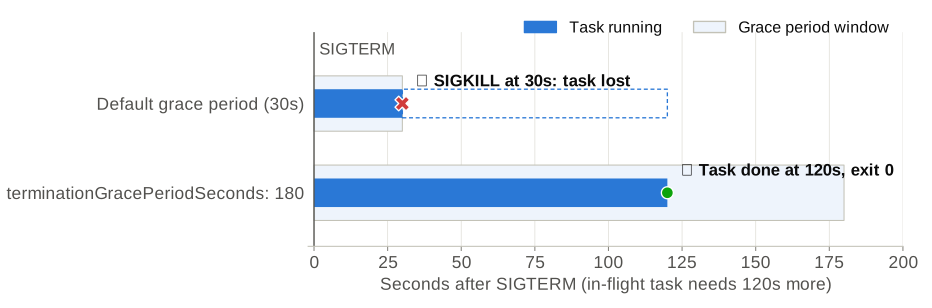
Same code, same task. The only difference is how long Kubernetes is allowed to wait.
Set terminationGracePeriodSeconds to your maximum task duration plus a buffer. For a 2-minute task, use at least 150 seconds:
apiVersion: apps/v1
kind: Deployment
metadata:
  name: etl-worker
spec:
  # No `replicas` here: the HPA or KEDA owns the replica count
  selector:
    matchLabels:
      app: etl-worker
  template:
    metadata:
      labels:
        app: etl-worker
    spec:
      # Default is 30 seconds. Size this to your longest task plus a buffer.
      terminationGracePeriodSeconds: 180
      containers:
        - name: etl-worker
          image: your-account.dkr.ecr.us-east-1.amazonaws.com/etl-worker:latest
          resources:
            requests:
              cpu: '500m'
              memory: '512Mi'
Leave replicas out of the manifest when an autoscaler manages the Deployment. Otherwise every kubectl apply resets the replica count and can trigger a scale-down by itself.
Add a PodDisruptionBudget so a node drain cannot evict too many workers at once:
apiVersion: policy/v1
kind: PodDisruptionBudget
metadata:
  name: etl-worker-pdb
spec:
  maxUnavailable: 10%
  selector:
    matchLabels:
      app: etl-worker
Pitfalls that still lose data
These are the cases where the code above is correct but data is still lost.
1. Your app is not PID 1, so it never sees SIGTERM
Kubernetes sends SIGTERM to PID 1 in the container. If your Dockerfile uses the shell form of CMD, PID 1 is /bin/sh, which does not forward signals to your app. Your handler never runs, and the pod is killed after the grace period.
# Bad: PID 1 is /bin/sh, your app never receives SIGTERM
CMD python worker.py

# Good: exec form, your app is PID 1
CMD ["python", "worker.py"]
The same applies to wrapper scripts: end them with exec python worker.py, or use a minimal init such as tini that forwards signals.
2. The queue redelivers the message while you’re still working on it
Design workers to acknowledge a message only after processing is complete. If a pod dies unexpectedly (node crash, OOMKilled), the unacknowledged message goes back to the queue and another worker picks it up. That makes tasks at-least-once, so make them idempotent (for example, upsert instead of insert).
With SQS, also make sure the visibility timeout is longer than your maximum task duration. If it isn’t, the message becomes visible again while the first worker is still processing it, and two workers do the same work.
3. The node disappears before your grace period ends
Node autoscalers have their own limits. Cluster Autoscaler waits at most 10 minutes for pods to terminate during scale-down by default (--max-graceful-termination-sec), and Karpenter has its own configurable termination grace period. A terminationGracePeriodSeconds longer than that won’t help.
Spot instances are stricter: AWS gives only a 2-minute interruption notice. Run Karpenter’s interruption handling or the AWS Node Termination Handler so pods are drained as soon as the notice arrives, and keep tasks short enough to finish inside that window.
The general rule: break long tasks into chunks of a few minutes, and checkpoint between chunks.
4. Scale-down is too aggressive
By default the HPA waits 5 minutes of lower load before scaling down (behavior.scaleDown.stabilizationWindowSeconds: 300), and then it is allowed to remove all surplus pods within 15 seconds. For bursty ETL loads, increase the window or add a scale-down policy that removes only a small percentage of pods per minute, so you’re not terminating hundreds of pods at once:
apiVersion: autoscaling/v2
kind: HorizontalPodAutoscaler
metadata:
  name: etl-worker
spec:
  scaleTargetRef:
    apiVersion: apps/v1
    kind: Deployment
    name: etl-worker
  minReplicas: 10
  maxReplicas: 1000
  metrics:
    - type: Resource
      resource:
        name: cpu
        target:
          type: Utilization
          averageUtilization: 70
  behavior:
    scaleDown:
      stabilizationWindowSeconds: 300
      policies:
        - type: Percent
          value: 10 # remove at most 10% of pods...
          periodSeconds: 60 # ...per minute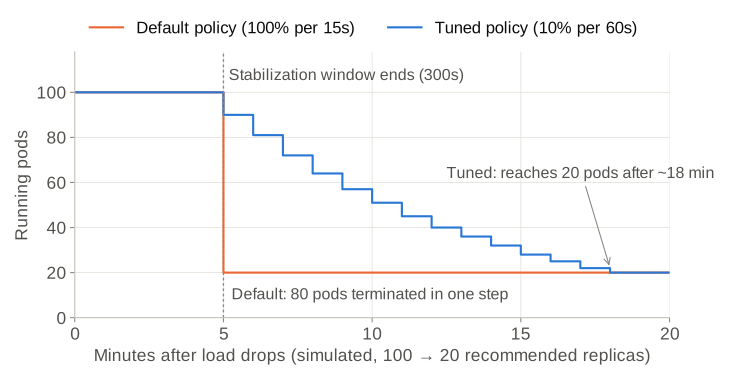
A simulation of both policies. With the default, 80 pods receive SIGTERM at the same moment. With the tuned policy, a few pods drain each minute, which spreads the load on your queue and database and limits the damage if something goes wrong.
For long, independent jobs, consider KEDA ScaledJob instead of a Deployment. Each task runs as its own Kubernetes Job, and scaling down never has to kill a running worker.
Checklist
- Worker catches
SIGTERMand stops taking new tasks - In-flight tasks finish (or checkpoint) before exit; connections closed; exit code 0
- Container uses exec-form
CMD, so the app is PID 1 -
terminationGracePeriodSecondsis greater than your longest task - Messages are ACKed only after processing, and tasks are idempotent
- SQS visibility timeout is longer than your longest task
-
PodDisruptionBudgetis in place - Tasks are short enough for node drain limits and Spot interruptions